Note
Access to this page requires authorization. You can try signing in or changing directories.
Access to this page requires authorization. You can try changing directories.
Note
Community interest groups have now moved from Yammer to Microsoft Viva Engage. To join a Viva Engage community and take part in the latest discussions, fill out the Request access to Finance and Operations Viva Engage Community form and choose the community you want to join.
Cost accounting helps you understand how costs flow to the products and services that an organization delivers. To achieve cost transparency, you need to allocate costs between cost objects using an appropriate allocation basis. By default, the system allocates costs for the primary cost element. This default allocation works well in some situations, but it has a few implications that you should consider.
- After overhead calculation, auxiliary cost objects have a zero balance for the primary cost element.
- The volume of cost entries generated by overhead calculation can be very high.
- You can't track the cost flow between cost objects.
To avoid these implications, use Cost accounting to configure cost allocation to fit your organization's managerial reporting requirements. This article discusses how you can determine the correct level of secondary cost elements and create cost rollup rules that fit organization reporting and cost traceability.
Note
You can change configurations if reporting requirements change.
Example of cost rollup policy setup
Imagine that an organization has the following structure with four cost centers.
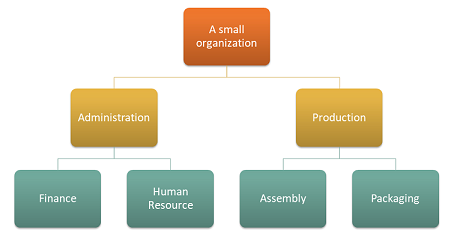
Cost object dimension
| Cost centers | Description |
|---|---|
| CC001 | HR |
| CC002 | Finance |
| CC003 | Assembly |
| CC004 | Packaging |
Cost element dimension
| Cost elements | Description | Type |
|---|---|---|
| 1001 | Electricity | Primary |
| 1002 | Salaries | Primary |
| 1003 | Advertising | Primary |
You can set up a dimension hierarchy that fulfills the organizational reporting requirements as follows.
Dimension hierarchy details
| Dimension hierarchy name | Dimension | Dimension hierarchy type name | Access list hierarchy |
|---|---|---|---|
| Organization | Cost centers | Dimension classification hierarchy | No |
Dimension hierarchy
| Dimension member ranges | ||
|---|---|---|
| Nodes | From dimension member | To dimension member |
| Organization | ||
| Admin | ||
| Finance | CC001 | CC001 |
| HR | CC002 | CC002 |
| Production | ||
| Packaging | CC003 | CC003 |
| Assembly | CC004 | C004 |
You can set up a dimension hierarchy that fulfills the policy requirement as follows.
Dimension hierarchy details
| Dimension hierarchy name | Dimension | Dimension hierarchy type name |
|---|---|---|
| Profit & Loss statement | Cost elements | Dimension classification hierarchy |
Dimension hierarchy
| Dimension member ranges | ||
|---|---|---|
| Nodes | From dimension member | To dimension member |
| Profit & Loss statement | ||
| Primary cost | 10001 | 10003 |
After processing the general ledger entries, the cost entry balance by cost object looks like this.
| Cost object | Total | ||||
|---|---|---|---|---|---|
| Cost element | CC001 | CC002 | CC003 | CC004* | |
| 1001 Electricity | 100.00 | 200.00 | 6,000.00 | 2,000.00 | 8,300.00 |
| 1002 Salaries | 10,000.00 | 10,000.00 | 8,000.00 | 6,500.00 | 34,500.00 |
| 1003 Advertising | 0.00 | 4,000.00 | 0.00 | 0.00 | 4,000.00 |
| 10.100,00 | 14.200,00 | 14.000,00 | 8.500,00 | 46.800,00 |
Statistical dimension
| Statistical elements | Description |
|---|---|
| SE-1 | HR services |
| SE-2 | Finance services |
Cost object CC001 HR contributes HR services to several cost objects.
The following table shows how HR services are consumed by the distribution of magnitude.
| Cost object | Description | HR services |
|---|---|---|
| CC002 | Finance | 35 |
| CC003 | Assembly | 55 |
| CC004 | Packaging | 10 |
Cost object CC002 Finance contributes to several cost objects.
The following table shows how finance services are consumed by the distribution of magnitude.
| Cost object | Description | Finance services |
|---|---|---|
| CC003 | Assembly | 65 |
| CC004 | Packaging | 35 |
Set up cost allocation policies as follows.
| Policy name | Description | Cost object dimension hierarchy | Statistical dimension | Cost element dimension |
|---|---|---|---|---|
| 2017 | Cost allocation | Organization | Statistical elements | Cost elements |
Set up cost allocation rules as follows.
| Cost object dimension hierarchy node | Cost behavior | Allocation base |
|---|---|---|
| CC001 | Total | HR services |
| CC002 | Total | Financial services |
How cost flows between cost centers
If you want to learn how cost flows between the cost centers in the organization, you can create cost elements of the type Secondary for each cost center. These cost elements will then be used to transfer balances between the cost centers during the overhead calculation.
Set up cost element dimension members as follows.
| Cost elements | Type | |
|---|---|---|
| 1001 | Electricity | Primary |
| 1002 | Salaries | Primary |
| 1003 | Advertising | Primary |
| SC-CC001 | HR | Secondary |
| SC-CC002 | Finance | Secondary |
| SC-CC003 | Assembly | Secondary |
| SC-CC004 | Packaging | Secondary |
Update the dimension hierarchy Profit & Loss statement with the new dimension members so that the dimension hierarchy contains the correct data for defining reporting and policies.
Dimension hierarchy details
| Dimension hierarchy name | Dimension | Dimension hierarchy type name |
|---|---|---|
| Profit & Loss statement | Cost elements | Dimension classification hierarchy |
Dimension hierarchy
| Dimension member ranges | ||
|---|---|---|
| Nodes | From dimension member | To dimension member |
| Profit & Loss statement | ||
| Primary cost | 10001 | 10003 |
| Secondary cost | SC-CC001 | SC-CC004 |
Create a Cost rollup policy where you map each cost center to a corresponding cost element of the type Secondary.
Cost rollup polices
| Policy name | Description | Cost object dimension hierarchy | Cost element dimension hierarchy |
|---|---|---|---|
| 2017 | Cost flow | Organization | Profit & Loss statement |
Cost rollup rules
| Cost object dimension hierarchy node | Cost element dimension hierarchy node | Secondary cost element |
|---|---|---|
| CC001 | Profit & Loss statement | SC-CC001 |
| CC002 | Profit & Loss statement | SC-CC002 |
| CC003 | Profit & Loss statement | SC-CC003 |
| CC004 | Profit & Loss statement | SC-CC004 |
Perform overhead calculation
Journal
| Journal | Journal type | Fiscal calendar period | Year | Period | Version |
|---|---|---|---|---|---|
| 00002 | Cost allocation journal | Fiscal | 2017 | Period 1 | Overhead calculation / 01-02-2017 11:51:00 PM / Ledger /2017 / Period 1 |
The system applies the Cost rollup policy when it creates the Cost object balance journal entries.
Cost object balance journal entries
| Accounting date | Cost object | Description | Cost element | Description | Amount |
|---|---|---|---|---|---|
| 31-01-2017 | CC001 | HR | SC-CC001 | HR | 10,100.00 |
| 31-01-2017 | CC002 | Finance | SC-CC002 | Finance | 17,735.00 |
| 31-01-2017 | CC003 | Assembly | SC-CC003 | Assembly | 31,082.75 |
| 31-01-2017 | CC004 | Packaging | SC-CC004 | Packaging | 15,717.25 |
Note
The system creates the journal entries based on the rules in the Cost rollup policy if a policy exists. The balance displayed is the balance of the overhead calculation.
The Cost object cost balance journal entry details page that you access from the journal entries displays how the balance is obtained.
Example: The journal entry for Cost object CC002 Finance
Cost object cost balance journal entry details
| Cost element dimension member | Description | Amount |
|---|---|---|
| 1001 | Electricity | 200.00 |
| 1002 | Salaries | 10,000.00 |
| 1003 | Advertising | 4,000.00 |
| SC-CC001 | HR | 3,535.00 |
Cost entries generated by the Overhead calculation
| Cost object | Description | Cost element | Description | Amount | Accounting date |
|---|---|---|---|---|---|
| CC001 | HR | SC-CC001 | HR | -10,100.00 | 31-01-2017 |
| CC002 | Finance | SC-CC001 | HR | 3,535.00 | 31-01-2017 |
| CC003 | Assembly | SC-CC001 | HR | 5,555.00 | 31-01-2017 |
| CC004 | Packaging | SC-CC001 | HR | 1,010.00 | 31-01-2017 |
| CC002 | Finance | SC-CC002 | Finance | -17,735.00 | 31-01-2017 |
| CC003 | Assembly | SC-CC002 | Finance | 11,527.75 | 31-01-2017 |
| CC004 | Packaging | SC-CC002 | Finance | 6,207.25 | 31-01-2017 |
After the Overhead calculation finishes, you can report the results by using tools such as Microsoft SharePoint Workspace, Excel, or Power BI.
View reporting in Excel
The dimension hierarchies allow you to view data at different aggregation levels.
Here's an example of Power Pivot reporting in Excel.
| Profit & Loss statement | Cost object | Total | |||
|---|---|---|---|---|---|
| CC001 | CC002 | CC003 | CC004** | ||
| Primary cost | 10,100.00 | 14,200.00 | 14,000.00 | 8,500.0 | 46,800.00 |
| 1001 | 100.00 | 200.00 | 6,000.00 | 2,000.00 | 8,300.00 |
| 1002 | 10,000.00 | 10,000.00 | 8,000.00 | 6,500.00 | 34,500.00 |
| 1003 | 0.00 | 4,000.00 | 0.00 | 0.00 | 4,000.00 |
| Secondary cost | -10,100.00 | -14,200.00 | 17,082.75 | 7,217.25 | 0.00 |
| SC-CC001 | -10,100.00 | 3,535.00 | 5,555.00 | 1,010.00 | 0.00 |
| SC-CC002 | 0.00 | -17,735.00 | 11,527.75 | 6,207.25 | 0.00 |
| SC-CC003 | 0.00 | 0.00 | 0.00 | 0.00 | 0.00 |
| SC-CC004 | 0.00 | 0.00 | 0.00 | 0.00 | 0.00 |
| Total | 0.00 | 0.00 | 31,082.75 | 15,717.25 | 46,800.00 |
By using Cost rollup policy and Cost elements of the type secondary, you can keep the primary cost per cost object for internal reporting as the primary cost that remains after Overhead calculation.
If you perform the same example without creating the Cost rollup policy, the reporting result is as shown in the following table. The cost flows correctly but the traceability and insight into how cost flows between the cost centers are lost.
| Profit & Loss statement | Cost object | Total | |||
|---|---|---|---|---|---|
| CC001 | CC002 | CC003 | CC004 | ||
| Primary cost | 0.00 | 0.00 | 31,082.75 | 15,717.25 | 46,800.00 |
| 1001 | 0.00 | 0.00 | 6,207.75 | 2,092.25 | 8,300.00 |
| 1002 | 0.00 | 0.00 | 22,275.00 | 12,225.00 | 34,500.00 |
| 1003 | 0.00 | 0.00 | 2,600.00 | 1,400.00 | 4,000.00 |
| Secondary cost | 0.00 | 0.00 | 0.00 | 0.00 | 0.00 |
| SC-CC001 | 0.00 | 0.00 | 0.00 | 0.00 | 0.00 |
| SC-CC002 | 0.00 | 0.00 | 0.00 | 0.00 | 0.00 |
| SC-CC003 | 0.00 | 0.00 | 0.00 | 0.00 | 0.00 |
| SC-CC004 | 0.00 | 0.00 | 0.00 | 0.00 | 0.00 |
| Total | 0.00 | 0.00 | 31,082.75 | 15,717.25 | 46,800.00 |
Depending on the reporting and traceability requirements in your organization, you can determine the correct level of secondary cost elements and create cost rollup rules that fit your needs.
The clear separation between Cost allocation and Cost rollup policies provides the flexibility to make continuous updates without affecting each other.