Note
Access to this page requires authorization. You can try signing in or changing directories.
Access to this page requires authorization. You can try changing directories.
Important
Some information relates to a prerelease product that may be substantially modified before it's released. Microsoft makes no warranties, expressed or implied, with respect to the information provided here.
The data exploration tool collection in the Microsoft Sentinel Model Context Protocol (MCP) server lets you search for relevant tables and retrieve data from Microsoft Sentinel's data lake by using natural language. It also includes graph tools that let you reason over multiple Microsoft Sentinel graphs, including exposure, hunting, and data risk graphs.
Prerequisites
To access the data exploration tool collection, you need the following prerequisites:
- Microsoft Sentinel data lake and graph
- Microsoft Sentinel data lake onboarded to Defender portal (required for graph tools)
- Any of the supported AI-powered code editors and agent-building platforms:
Important
Access to Sentinel MCP tools is supported for users, managed identities, or service principals that are assigned with at least any of the following roles:
- Security Administrator
- Security Operator
- Security Reader
To access the graph data in Defender portal, at least read-only access in Microsoft Security Exposure Management is required.
Add the data exploration collection
To add the data exploration collection, first set up Microsoft Sentinel's unified MCP server interface. Follow the step-by-step instructions for compatible AI-powered code editors and agent-building platforms.
The data exploration collection is hosted at the following URL:
https://sentinel.microsoft.com/mcp/data-exploration
Tools in the data exploration collection
The data exploration collection includes the following tools:
- Semantic search on table catalog — Discover relevant data lake tables and their schemas.
- Execute KQL query — Run KQL queries against a Microsoft Sentinel data lake workspace.
- List workspaces — List all available Microsoft Sentinel data lake workspaces.
- Entity analyzer — Analyze users and URLs with AI-driven risk verdicts and insights.
- Graph tools (preview) — Reason over exposure, hunting, and data risk graphs.
Semantic search on table catalog (search_tables)
This tool discovers data lake tables relevant to a given natural language input and returns schema definitions to support query authoring. Use this tool to discover tables, understand a schema, or build valid Kusto Query Language (KQL) queries for a Microsoft Sentinel workspace. You can also use it to explore unfamiliar data sources or identify relevant tables for a specific investigative or analytical task.
| Parameters | Required? | Description |
|---|---|---|
query |
Yes | This parameter takes in keywords to search for relevant tables in the connected workspaces. |
workspaceId |
No | This parameter takes in a workspace identifier to limit the search to a single connected Microsoft Sentinel data lake workspace. |
Supported tables
This tool supports nearly all known standard and partner content hub tables out of the box, including Azure Monitor Log Analytics tables organized by category and most Microsoft Sentinel tables and associated connectors.
Expand to see the full list of supported third-party tables
| Provider | Supported tables |
|---|---|
| Abnormal Security | ABNORMAL_CASES_CL, ABNORMAL_THREAT_MESSAGES_CL |
| ADO (Azure DevOps) | ADOAuditLogs_CL |
| AIShield | AIShield_CL |
| AliCloud | AliCloud_CL |
| Amazon Web Services (AWS) | AWSCloudFront_AccessLog_CL, AWSCloudTrail, AWSCloudWatch, AWSGuardDuty, AWSNetworkFirewallAlert, AWSNetworkFirewallFlow, AWSNetworkFirewallTls, AWSRoute53Resolver, AWSS3ServerAccess, AWSSecurityHubFindings, AWSVPCFlow, AWSWAF |
| Anvilogic | Anvilogic_Alerts_CL |
| Apache | ApacheHTTPServer_CL |
| ARGOS | ARGOS_CL |
| Armis | Armis_Activities_CL, Armis_Alerts_CL, Armis_Devices_CL |
| Atlassian | atlassian_beacon_alerts_CL |
| Auth0 | Auth0AM_CL |
| Better Mobile | BetterMTDAppLog_CL, BetterMTDDeviceLog_CL, BetterMTDIncidentLog_CL, BetterMTDNetflowLog_CL |
| Bitglass | BitglassLogs_CL |
| BitSight | BitsightAlerts_data_CL, BitsightBreaches_data_CL, BitsightCompany_details_CL, BitsightCompany_rating_details_CL, BitsightDiligence_historical_statistics_CL, BitsightDiligence_statistics_CL, BitsightFindings_data_CL, BitsightFindings_summary_CL, BitsightGraph_data_CL, BitsightIndustrial_statistics_CL, BitsightObservation_statistics_CL |
| Box | BoxEvents_CL, BoxEventsV2_CL |
| Carbon Black | CarbonBlackAuditLogs_CL, CarbonBlackEvents_CL, CarbonBlackNotifications_CL |
| CBS | CBSLog_Azure_1_CL |
| Cisco | Cisco_Umbrella_audit_CL, Cisco_Umbrella_cloudfirewall_CL, Cisco_Umbrella_dlp_CL, Cisco_Umbrella_dns_CL, Cisco_Umbrella_fileevent_CL, Cisco_Umbrella_firewall_CL, Cisco_Umbrella_intrusion_CL, Cisco_Umbrella_ip_CL, Cisco_Umbrella_ravpnlogs_CL, Cisco_Umbrella_ztaflow_CL, Cisco_Umbrella_ztna_CL, CiscoETD_CL, CiscoSDWANNetflow_CL, CiscoSecureEndpointAuditLogsV2_CL, CiscoSecureEndpointEventsV2_CL |
| Cloudflare | Cloudflare_CL, CloudflareV2_CL |
| Cognni | CognniIncidents_CL |
| Cohesity | Cohesity_CL |
| Commvault | CommvaultSecurityIQ_CL |
| Contrast Security | ContrastADR_CL, ContrastADRIncident_CL |
| Cribl | CriblInternal_CL |
| CrowdStrike | CrowdStrike_Additional_Events_CL, CrowdStrikeAlerts, CrowdStrikeDetections, CrowdStrikeHosts, CrowdStrikeIncidents, CrowdStrikeVulnerabilities |
| CyberArk | CyberArk_AuditEvents_CL |
| Cyberpion | CyberpionActionItems_CL |
| Cyfirma | CyfirmaASCertificatesAlerts_CL, CyfirmaASCloudWeaknessAlerts_CL, CyfirmaASConfigurationAlerts_CL, CyfirmaASDomainIPReputationAlerts_CL, CyfirmaASDomainIPVulnerabilityAlerts_CL, CyfirmaASOpenPortsAlerts_CL, CyfirmaBIDomainITAssetAlerts_CL, CyfirmaBIExecutivePeopleAlerts_CL, CyfirmaBIMaliciousMobileAppsAlerts_CL, CyfirmaBIProductSolutionAlerts_CL, CyfirmaBISocialHandlersAlerts_CL, CyfirmaCampaigns_CL, CyfirmaCompromisedAccounts_CL, CyfirmaDBWMDarkWebAlerts_CL, CyfirmaDBWMPhishingAlerts_CL, CyfirmaDBWMRansomwareAlerts_CL, CyfirmaIndicators_CL, CyfirmaMalware_CL, CyfirmaSPEConfidentialFilesAlerts_CL, CyfirmaSPEPIIAndCIIAlerts_CL, CyfirmaSPESocialThreatAlerts_CL, CyfirmaSPESourceCodeAlerts_CL, CyfirmaThreatActors_CL, CyfirmaVulnerabilities_CL |
| Cymru Scout | Cymru_Scout_Account_Usage_Data_CL, Cymru_Scout_Domain_Data_CL, Cymru_Scout_IP_Data_Communications_CL, Cymru_Scout_IP_Data_Details_CL, Cymru_Scout_IP_Data_Fingerprints_CL, Cymru_Scout_IP_Data_Foundation_CL, Cymru_Scout_IP_Data_OpenPorts_CL, Cymru_Scout_IP_Data_PDNS_CL, Cymru_Scout_IP_Data_Summary_Certs_CL, Cymru_Scout_IP_Data_Summary_Details_CL, Cymru_Scout_IP_Data_Summary_Fingerprints_CL, Cymru_Scout_IP_Data_Summary_OpenPorts_CL, Cymru_Scout_IP_Data_Summary_PDNS_CL, Cymru_Scout_IP_Data_x509_CL |
| Cynerio | CynerioEvent_CL |
| Darktrace | darktrace_model_alerts_CL |
| Databricks | DatabricksAccounts, DatabricksApps, DatabricksBrickStoreHttpGateway, DatabricksBudgetPolicyCentral, DatabricksCapsule8Dataplane, DatabricksClamAVScan, DatabricksCloudStorageMetadata, DatabricksClusterLibraries, DatabricksClusterPolicies, DatabricksClusters, DatabricksDashboards, DatabricksDatabricksSQL, DatabricksDataMonitoring, DatabricksDataRooms, DatabricksDBFS, DatabricksDeltaPipelines, DatabricksFeatureStore, DatabricksFiles, DatabricksFilesystem, DatabricksGenie, DatabricksGitCredentials, DatabricksGlobalInitScripts, DatabricksGroups, DatabricksIAMRole, DatabricksIngestion, DatabricksInstancePools, DatabricksJobs, DatabricksLakeviewConfig, DatabricksLineageTracking, DatabricksMarketplaceConsumer, DatabricksMarketplaceProvider, DatabricksMLflowAcledArtifact, DatabricksMLflowExperiment, DatabricksModelRegistry, DatabricksNotebook, DatabricksOnlineTables, DatabricksPartnerHub, DatabricksPredictiveOptimization, DatabricksRBAC, DatabricksRemoteHistoryService, DatabricksRepos, DatabricksRFA, DatabricksSecrets, DatabricksServerlessRealTimeInference, DatabricksSQL, DatabricksSQLPermissions, DatabricksSSH, DatabricksTables, DatabricksUnityCatalog, DatabricksVectorSearch, DatabricksWebhookNotifications, DatabricksWebTerminal, DatabricksWorkspace, DatabricksWorkspaceFiles |
| Dataminr | DataminrPulse_Alerts_CL |
| Digital Shadows | DigitalShadows_CL |
| Doppel | DoppelTable_CL |
| Dragos | DragosAlerts_CL |
| ESI (Exchange Security Insights) | ESIExchangeConfig_CL, ESIExchangeOnlineConfig_CL |
| Exchange | ExchangeHttpProxy_CL, MessageTrackingLog_CL |
| ExtraHop | ExtraHop_Detections_CL |
| F5 | F5Telemetry_ASM_CL, F5Telemetry_LTM_CL, F5Telemetry_system_CL |
| Feedly | feedly_indicators_CL |
| Forescout | FncEventsDetections_CL, FncEventsObservation_CL, FncEventsSuricata_CL, ForescoutHostProperties_CL |
| Forcepoint | ForcepointDLPEvents_CL |
| Gigamon | Gigamon_CL |
| GitHub | githubscanaudit_CL |
GCPApigee, GCPAuditLogs, GCPCDN, GCPCloudRun, GCPCloudSQL, GCPComputeEngine, GCPDNS, GCPFirewallLogs, GCPIAM, GCPIDS, GCPLoadBalancer, GCPMonitoring, GCPNAT, GCPNATAudit, GCPResourceManager, GCPVPCFlow, GKEAPIServer, GKEApplication, GKEAudit, GKEControllerManager, GKEHPADecision, GKEScheduler, GoogleCloudSCC, GoogleWorkspaceReports |
|
| HackerView | HackerViewLog_Azure_1_CL |
| Illumio | Illumio_Auditable_Events_CL, IlumioInsights |
| Imperva | ImpervaWAFCloud_CL |
| Infoblox | dossier_atp_CL, dossier_atp_threat_CL, dossier_dns_CL, dossier_geo_CL, dossier_infoblox_web_cat_CL, dossier_inforank_CL, dossier_malware_analysis_v3_CL, dossier_nameserver_CL, dossier_nameserver_matches_CL, dossier_ptr_CL, dossier_rpz_feeds_CL, dossier_rpz_feeds_records_CL, dossier_threat_actor_CL, dossier_tld_risk_CL, dossier_whois_CL, Infoblox_Failed_Indicators_CL, InfobloxInsight_CL |
| InfoSec | InfoSecAnalytics_CL |
| Jamf Protect | jamfprotectalerts_CL, jamfprotecttelemetryv2_CL, jamfprotectunifiedlogs_CL |
| Jira | Jira_Audit_CL, Jira_Audit_v2_CL |
| Juniper | JuniperIDP_CL |
| Keeper Security | KeeperSecurityEventNewLogs_CL |
| LastPass | LastPassNativePoller_CL |
| MailGuard 365 | MailGuard365_Threats_CL |
| MailRisk | MailRiskEmails_CL |
| MarkLogic | MarkLogicAudit_CL |
| MDBA | MDBALogTable_CL |
| Meraki | meraki_CL |
| Mimecast | MimecastAudit_CL, MimecastDLP_CL, MimecastSIEM_CL, MimecastTTPAttachment_CL, MimecastTTPImpersonation_CL, MimecastTTPUrl_CL |
| MongoDB | MongoDBAudit_CL |
| MuleSoft | MuleSoft_Cloudhub_CL |
| NCProtect | NCProtectUAL_CL |
| Netskope | alertscompromisedcredentialdata_CL, alertsctepdata_CL, alertsdlpdata_CL, alertsmalsitedata_CL, alertsmalwaredata_CL, alertspolicydata_CL, alertsquarantinedata_CL, alertsremediationdata_CL, alertssecurityassessmentdata_CL, alertsubadata_CL, Audits_Data_CL, Detections_Data_CL, Entities_Data_CL, Entity_Scoring_Data_CL, eventsapplicationdata_CL, eventsauditdata_CL, eventsconnectiondata_CL, eventsincidentdata_CL, eventsnetworkdata_CL, eventspagedata_CL, Lockdown_Data_CL, net_assets_CL, Netskope_WebTx_metrics_CL, NetskopeAlerts_CL, NetskopeWebtxData_CL, NetskopeWebtxErrors_CL, web_assets_CL |
| Nginx | NGINX_CL, NginxUpstreamUpdateLogs |
| NordPass | NordPassEventLogs_CL |
| OCI (Oracle Cloud Infrastructure) | OCI_LogsV2_CL |
| Okta | Okta_CL, OktaSystemLogs |
| 1Password | OnePasswordEventLogs_CL |
| OneLogin | OneLoginEventsV2_CL, OneLoginUsersV2_CL |
| Oracle | OracleCloudDatabase |
| Orca | OrcaAlerts_CL |
| Palo Alto Networks | CortexXDR_Incidents_CL, PaloAltoCortexXDR_Incidents_CL, PaloAltoPrismaCloudAlertV2_CL |
| Perimeter 81 | Perimeter81_CL |
| PostgreSQL | PostgreSQL_CL |
| Prancer | prancer_CL |
| Proofpoint | ProofPointTAPClicksPermittedV2_CL, ProofPointTAPMessagesDeliveredV2_CL |
| Qualys | QualysHostDetectionV3_CL, QualysKB_CL |
| Rapid7 Nexpose/InsightVM | NexposeInsightVMCloud_assets_CL, NexposeInsightVMCloud_vulnerabilities_CL |
| Rubrik | Rubrik_Anomaly_Data_CL, Rubrik_Events_Data_CL, Rubrik_Ransomware_Data_CL, Rubrik_ThreatHunt_Data_CL |
| SailPoint | SailPointIDN_Events_CL, SailPointIDN_Triggers_CL |
| Salesforce | SalesforceServiceCloudV2_CL |
| SAP | SAPBTPAuditLog_CL, SAPETDAlerts_CL, SAPETDInvestigations_CL |
| SecurityBridge | SecurityBridgeLogs_CL |
| SentinelOne | SentinelOne_CL, SentinelOneActivities_CL, SentinelOneAgents_CL, SentinelOneAlerts_CL, SentinelOneGroups_CL, SentinelOneThreats_CL |
| Snowflake | SnowflakeLoad_CL, SnowflakeLogin_CL, SnowflakeMaterializedView_CL, SnowflakeQuery_CL, SnowflakeRoleGrant_CL, SnowflakeRoles_CL, SnowflakeTables_CL, SnowflakeTableStorageMetrics_CL, SnowflakeUserGrant_CL, SnowflakeUsers_CL |
| Sonrai | Sonrai_Tickets_CL |
| Sophos | SophosCloudOptix_CL, SophosEP_CL, SophosEPEvents_CL |
| Squid Proxy | SquidProxy_CL |
| Symantec | SymantecICDx_CL |
| Talon | Talon_CL |
| Tenable | Tenable_VM_Asset_CL, Tenable_VM_Compliance_CL, Tenable_VM_Vuln_CL, Tenable_WAS_Vuln_CL |
| TheHive | TheHive_CL |
| Theom | TheomAlerts_CL |
| Tomcat | Tomcat_CL |
| Trend Micro | TrendMicro_XDR_OAT_CL, TrendMicro_XDR_RCA_Result_CL, TrendMicro_XDR_RCA_Task_CL, TrendMicro_XDR_WORKBENCH_CL |
| Varonis | VaronisAlerts_CL |
| Vectra | VectraStream_CL |
| Veeam | VeeamAuthorizationEvents_CL, VeeamCovewareFindings_CL, VeeamMalwareEvents_CL, VeeamOneTriggeredAlarms_CL, VeeamSecurityComplianceAnalyzer_CL, VeeamSessions_CL |
| WatchGuard | WsSecurityEvents_CL |
| Workplace from Meta | Workplace_Facebook_CL |
| ZeroFox | ZeroFox_CTI_advanced_dark_web_CL, ZeroFox_CTI_botnet_CL, ZeroFox_CTI_breaches_CL, ZeroFox_CTI_C2_CL, ZeroFox_CTI_compromised_credentials_CL, ZeroFox_CTI_credit_cards_CL, ZeroFox_CTI_dark_web_CL, ZeroFox_CTI_discord_CL, ZeroFox_CTI_disruption_CL, ZeroFox_CTI_email_addresses_CL, ZeroFox_CTI_exploits_CL, ZeroFox_CTI_irc_CL, ZeroFox_CTI_malware_CL, ZeroFox_CTI_national_ids_CL, ZeroFox_CTI_phishing_CL, ZeroFox_CTI_phone_numbers_CL, ZeroFox_CTI_ransomware_CL, ZeroFox_CTI_telegram_CL, ZeroFox_CTI_threat_actors_CL, ZeroFox_CTI_vulnerabilities_CL, ZeroFoxAlertPoller_CL |
| Zoom | Zoom_CL |
| Zscaler | ZNSegmentAudit_CL, ZPA_CL |
| Other | Failed_Range_To_Ingest_CL, FinanceOperationsActivity_CL, fluentbit_CL, IntegrationTable_CL, IntegrationTableIncidents_CL |
The following Microsoft Sentinel tables aren't supported:
| Unsupported Microsoft Sentinel tables | |
|---|---|
|
|
Execute KQL (Kusto Query Language) query on Microsoft Sentinel data lake (query_lake)
This tool runs a single KQL query against a specified Microsoft Sentinel data lake workspace and returns the raw result set. It's designed for focused investigative or analytical retrieval and not bulk export. Use this tool to advance an investigation or analytical workflow and retrieve a security event, alert, asset, identity, device, or enrichment data. You can also use it alongside the search_tables tool to identify relevant table schemas and build valid KQL queries.
| Parameters | Required? | Description |
|---|---|---|
query |
Yes | This parameter takes in a well-formed KQL query to retrieve data from a Microsoft Sentinel data lake workspace. |
workspaceId |
No | This parameter takes in a workspace identifier to limit the search to a single connected Microsoft Sentinel data lake workspace. |
List workspaces (list_sentinel_workspaces)
This tool lists all Microsoft Sentinel data lake workspace name and ID pairs available to you. Including the workspace name provides you with helpful context to understand which workspace is being used. Run this tool before using any other Microsoft Sentinel tools because those tools need a workspace ID argument to function properly.
Entity analyzer
These tools use AI to analyze your organization's data in the Microsoft Sentinel data lake. They provide a verdict and detailed insights on URLs, domains, and user entities. They help eliminate the need for manual data collection and complex integrations typically required for enriching and investigating entities.
For example, analyze_user_entity reasons over the user's authentication patterns, behavioral anomalies, activity within your organization, and more to provide a verdict and analysis. The analyze_url_entity tool reasons over Microsoft threat intelligence, your custom threat intelligence in Microsoft Sentinel threat intelligence platform (TIP), and URL activity within your organization. It also checks Microsoft Sentinel watchlists to provide a verdict and analysis.
Entity analysis tools might require a few minutes to generate results, so there are tools to start analysis for each entity and another one that polls for the analysis results.
Important
To use the entity analyzer tool, you also need the following roles:
- Security Copilot Contributor – This role is required to use the tool, which consumes Security Compute Units (SCUs) to deliver reasoned entity risk analysis.
- Security Copilot Owner (optional) – This role is only required to view and monitor SCU usage.
For more information, see Understand authentication in Microsoft Security Copilot.
Start analysis (analyze_user_entity and analyze_url_entity)
| Parameters | Required? | Description |
|---|---|---|
| Microsoft Entra object ID, User Principal Name (UPN), or URL | Yes | This parameter takes in the user or URL you want to analyze. |
startTime |
Yes | This parameter takes in the start time of the analysis window. |
endTime |
Yes | This parameter takes in the end time of the analysis window. |
workspaceId |
No | This parameter takes in a workspace identifier to limit the search to a single connected Microsoft Sentinel data lake workspace. |
These tools return an identifier value that you can provide to the retrieve analysis tool as input.
Retrieve analysis (get_entity_analysis)
| Parameters | Required? | Description |
|---|---|---|
analysisId |
Yes | This parameter takes in the job identifier received from the start analysis tools. |
While this tool automatically polls for a few minutes until results are ready, its internal timeout might not be sufficient for long analysis operations. You might need to run it multiple times to get results.
Note
It might be beneficial to include a prompt such as render the results as returned exactly from the tool, which helps ensure that the response from the analyzer is provided without additional processing by the MCP client.
Additional information
analyze_user_entitysupports a maximum time window of seven days to maximize accuracy of the results.analyze_user_entityonly works for users with a Microsoft Entra object ID (users). On-premises Active Directory-only users aren't supported for user analysis.analyze_user_entityrequires the following tables to be present in the data lake to ensure accuracy of the analysis:- AlertEvidence
- SigninLogs
- CloudAppEvents
- IdentityInfo (Available only for tenants with Microsoft Defender for Identity, Microsoft Defender for Cloud Apps, or Microsoft Defender for Endpoint P2 licensing)
If you don't have any of these required tables,
analyze_user_entitygenerates an error message that lists the tables you didn't onboard, along with links to their corresponding onboarding documentation.analyze_user_entityworks best when the following tables are also present in the data lake, but continues to work and assess risk, even if these tables are unavailable:analyze_url_entityworks best when the following tables are present in the data lake, but continues to work and assess risk, even if these tables are unavailable:If you don't have any of these tables,
analyze_url_entitygenerates a response with a disclaimer that lists the tables you didn't onboard, along with links to their corresponding onboarding documentation.Running multiple instances of the entity analyzer at the same time can increase latency for each run. To prevent timeouts and avoid hitting the entity analyzer's preview thresholds, start by running a maximum of five analyses at once and then adjust it as needed based on how often the logic app is triggered in your organization.
Graph tools (preview)
Important
This information relates to a prerelease product that may be substantially modified before it's released. Microsoft makes no warranties, expressed or implied, with respect to the information provided here.
The graph tools let you reason over multiple Microsoft Sentinel graphs, including exposure, hunting, and blast radius graphs. By using these tools, you can gather insights and make data-driven decisions while querying in natural language.
Blast radius finder (find_blastradius)
This tool evaluates the blast radius of a node by exploring propagation paths towards an organization's critical assets. It details the paths that start at the entity you provide, evaluates the risk, and specifies recommendations to reduce it.
| Parameters | Required? | Description |
|---|---|---|
sourceName |
Yes | This parameter takes in keywords to search for relevant information matching an entity in the graph. It can be a node or a group of nodes. |
Connection and path discovery (find_walkable_paths)
This tool enumerates the connections between any given pairs of sources and targets. It analyzes the nature of the connections and then decides whether it can be traversed for lateral movement.
| Parameters | Required? | Description |
|---|---|---|
sourceName |
Yes | This parameter takes in keywords to match an entity within the graph for the path starting point. |
targetName |
Yes | This parameter takes in keywords to match an entity within the graph for the path target. |
Exposure perimeter analyzer (find_exposure_perimeter)
This tool lists the incoming connections from other entities to the specified entity. It helps you determine the risk that the entity faces. The tool might return prioritized recommendations based on the results.
| Parameters | Required? | Description |
|---|---|---|
targetName |
Yes | This parameter takes in keywords to identify and match an entity in the graph; the node's name. |
minPathLength |
No | This parameter takes in the minimum number of hops in a path. |
maxPathLength |
No | This parameter takes in the maximum number of hops in a path. |
resultsCountLimit |
No | This parameter takes in the maximum number of paths to return. |
Path between two entities (find_connected_nodes)
This tool lists traversable paths between two entities that match a criteria or characteristic that describes those entities.
| Parameters | Required? | Description |
|---|---|---|
sourceNodeLabel |
Yes | This parameter takes in a valid source label to filter on. For supported labels, use the get_graph_context tool. |
sourceNodeProperties |
No | This parameter takes in a list of valid properties for the starting point entity, separated by commas. For supported properties, use the get_graph_context tool. |
targetNodeLabel |
Yes | This parameter takes in a valid target label to filter on. For supported labels, use the get_graph_context tool. |
targetNodeProperties |
No | This parameter takes in a list of valid properties for the ending point entity, separated by commas. For supported properties, use the get_graph_context tool. |
resultsCountLimit |
No | This parameter takes in the maximum number of results to return. |
Nodes match (find_nodes)
This tool finds and matches entities that the graph represents as nodes based on given criteria or characteristics. It returns a list of nodes that match the defined criteria.
| Parameters | Required? | Description |
|---|---|---|
validNodeLabel |
Yes | This parameter takes in a node label to match. For supported labels, use the get_graph_context tool. |
validNodeProperties |
No | This parameter takes in a list of properties to match, separated by commas. For supported properties, use the get_graph_context tool. |
resultsLimit |
No | This parameter takes in the maximum number of results to return. |
General information and context for graph (get_graph_context)
This tool provides context for the parameters and serves as a reference to help you understand which tools, functionalities, or parameters you can use. Use it as a helper to get the graph context so you can better use the other graph MCP tools in the collection.
Additional information for graph tools
- To scope results to graph only, add
in my graphto prompts. - Querying for identities doesn't support user principal names (UPNs).
- When you specify the type of the entity, use it before the name.
- Installing and configuring the graph tool collection carries no cost. However, you invoke the graph meter when you start using the tools to query a Microsoft Sentinel graph. For more information, see: Plan costs and understand Microsoft Sentinel pricing and billing.
Sample prompts
The following sample prompts demonstrate what you can do with the data exploration collection:
- Find the top three users that are at risk and explain why they're at risk.
- Find sign-in failures in the last 24 hours and give me a brief summary of key findings.
- Identify devices that showed an outstanding number of outgoing network connections.
- Help me understand if the user <user object ID> is compromised.
- Investigate users with a password spray alert in the last seven days and tell me if any of them are compromised.
- Find all the URL IOCs from <threat analytics report> and analyze them to tell me everything Microsoft knows about them.
- What is the blast radius of node X if compromised?
- List all paths from user X to critical assets.
- What is the exposure perimeter of my critical SQL servers?
How Microsoft Sentinel MCP tools work alongside your agent
The following example shows how an agent answers a prompt by dynamically orchestrating over the tools.
Sample prompt: Find the top three users that are at risk and explain why they're at risk.
Typical response (GitHub Copilot using Claude Sonnet 4):

Explanation:
When the agent receives the prompt, it searches for relevant tables that contain user risk and security information. It starts by deconstructing the prompt into search keywords to find the tables.
From the sample prompt, its search identifies four relevant tables from the scope of tables that the user has access to:
AADNonInteractiveUserSignInLogs- Non-interactive Microsoft Entra ID sign-in eventsBehaviorAnalytics- User and Entity Behavior Analytics (UEBA) dataSigninLogs- Interactive Microsoft Entra ID sign-in eventsAADUserRiskEvents- Identity protection risk detections
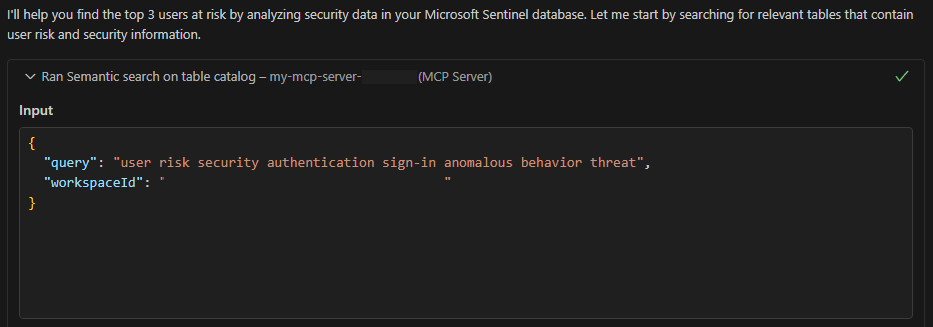
The agent does another search by using the Semantic search on table catalog (
search_tables) tool, this time with broader terms, to find other tables that it should query data from to influence its reasoning.
The agent identifies the relevant tables and then uses the Execute KQL (Kusto Query Language) query on Microsoft Sentinel data lake (
query_lake) tool to query for data and find the top three users at risk. The first attempt fails because the KQL query has a semantic error.
The agent corrects the KQL query by itself and successfully retrieves data from Microsoft Sentinel data lake, finding the risky users.
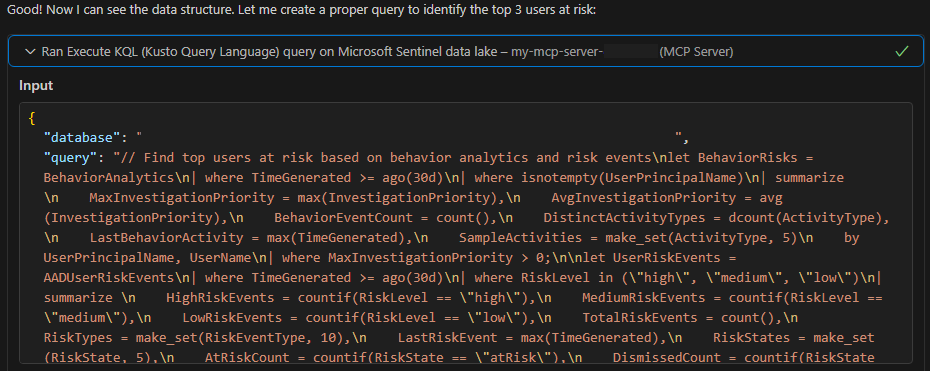
The agent runs one more query to get detailed information about the risky users to provide better context on why they're at risk.

The agent responds back to the user with its comprehensive analysis.


