Note
Access to this page requires authorization. You can try signing in or changing directories.
Access to this page requires authorization. You can try changing directories.
Enabling geo-replication for an Azure Container Registry (ACR) creates geo-replica resources in Azure regions of your choosing. When you push images to a geo-replicated registry, content automatically syncs to all geo-replicas.
With geo-replication:
- Manage one registry: Maintain a single set of credentials, role assignments, networking rules, and registry configuration across all geo-replicas.
- Use one global endpoint: Reference
myregistry.azurecr.io/myimage:tagin all your builds and deployments. Azure routes requests to the geo-replica with the best network performance profile for the client, which is usually the closest geo-replica. However, if the client is equidistant to multiple geo-replicas or the closest geo-replica is unavailable, requests might be routed elsewhere. - Automatic syncing: Push tags and digests once; ACR replicates content and metadata to all geo-replicas.
Geo-replication requires the Premium SKU.
Note
- To copy images between separate registries, see Import container images.
- To move a registry's home region to a different region, see Relocate Azure Container Registry.
High availability considerations
Replication model
ACR geo-replication uses an active-active model.
- All geo-replicas are active and writable—you can push, pull, and delete images from any geo-replica, not just the home region's geo-replica.
- This differs from primary-secondary replication models where only one region accepts writes and secondary regions are passive.
Consistency model
ACR uses eventual consistency.
- After you push or delete an image in any geo-replica, ACR eventually replicates the change to all geo-replicas in the background.
- Replication time depends on image size. A pushed image or tag might not be immediately available for pull in other geo-replicas if large volumes of images or large image sizes are pushed. Similarly, a deleted image or tag might still be available for pull in other geo-replicas until the deletion propagates.
- The time it takes to create a new geo-replica scales with the total size of the registry. When creating a new geo-replica, existing geo-replicas continue serving push, pull, and delete traffic normally. There's no restricted state or degradation window while the new geo-replica catches up in the background.
- Until replication eventually completes in the background, a geo-replica might not have the latest content or metadata. You can use webhooks to receive notifications when replication for a specific pushed image completes in each geo-replica.
Important
Eventual consistency failure modes to plan for:
- Push-then-immediate-pull-cross-region — Pushing an image to one geo-replica and immediately pulling it from a different geo-replica can fail with
manifest unknownuntil replication catches up. This commonly affects CI/CD pipelines where a CI runner pushes an image and pods across multiple regions immediately attempt to pull it. - Tag overwrite races — Pushing
myapp:v1, then re-pushingmyapp:v1shortly after with a different digest (same tag, different content), can leave different geo-replicas resolving the same tag to different digests during the replication window. - Delete propagation — Deleting a tag or repository in one region takes time to propagate. Pulls from geo-replicas where the delete hasn't propagated yet can still return the deleted content.
- Mid-push failover scatter — A multi-layer push that spans a health-aware failover boundary or a DNS bouncing event can land layers on one geo-replica and the manifest on another, surfacing as manifest validation errors or
blob unknownon subsequent pulls. See Push fails with manifest errors for mitigations.
Mitigations:
- Build retry logic into pulls that immediately follow a cross-region push — either retry with backoff or check replication status before pulling.
- Use webhooks to receive notifications when replication completes in each geo-replica before triggering cross-region pulls.
Data plane high availability
Geo-replication improves data plane availability by keeping images in multiple regions. If one region has an outage, images remain accessible from other geo-replicas—pushing, pulling, and deleting continue working through the remaining geo-replicas.
Zone redundancy is always enabled for geo-replicas—ACR automatically spreads replica data across multiple availability zones to protect against zonal outages.
Note
If your registry uses a customer-managed key, review the key vault failover and redundancy guidance for maximum resilience.
Health-aware failover
ACR automatically monitors the health of each geo-replica and reroutes global endpoint traffic away from geo-replicas that can't reliably serve requests. This is called health-aware failover. ACR routes global endpoint traffic based on ACR service health and Azure regional infrastructure health.
- Automatic and per-registry: Health is evaluated on a per-registry basis, not per-region. If a degradation affects only a subset of registries in a region, only those registries are rerouted — other registries in the same region continue to be served locally with no unnecessary latency penalty.
- Timing: End-to-end rerouting is on the order of minutes, fast enough to catch real regional degradation and slow enough to ride out transient errors that resolve on their own. DNS TTL might add propagation delay before all clients switch to the new region.
- No customer action required: There's no customer-invocable trigger. Health-aware failover is fully platform-managed.
- Failback is automatic: Once a geo-replica's regional health evaluation passes again, such as when regional ACR or Azure infrastructure recovers, the global endpoint is able to resume routing traffic to the geo-replica in the recovered Azure region.
- Not triggered by throttling: Health-aware failover is DNS-based and responds to regional ACR service health and Azure infrastructure health. It does not reroute traffic based on HTTP 429 (throttling) responses. If a geo-replica is throttling your requests but the region's infrastructure is healthy, the global endpoint continues routing you to that geo-replica. To manage throttling, use regional endpoints to spread workloads across multiple geo-replicas for better capacity distribution.
Scope of health-aware failover:
Health-aware failover applies only to operations against the global endpoint (myregistry.azurecr.io). It does not apply to:
- Regional endpoints — When you use a regional endpoint (
myregistry.<region>.geo.azurecr.io), you're talking directly to one specific geo-replica. If that region degrades, ACR doesn't automatically reroute. Implement client-side failover by switching to a different regional endpoint. - Dedicated data endpoints — Once a registry endpoint redirects you to a dedicated data endpoint for a layer download, you stay on that region's data endpoint throughout the download. The region is decided up front by whichever registry endpoint served the blob-location call.
Throttling during failover:
Throttling limits on API operations are per-replica. During a health-aware failover, traffic that was spread across multiple geo-replicas can shift heavily onto whichever geo-replicas remain in the global endpoint's routing pool. Capacity plan to have at least two or three geo-replicas so that traffic can spread across multiple healthy geo-replicas during a failover. Registries with only two regions can hit per-replica throttling limits more easily when one region is unavailable. To mitigate, use regional endpoints to spread workloads across multiple geo-replicas and plan per-replica capacity.
How to confirm a failover:
- Azure portal: Navigate to your registry and select Resource health under the Help section to see platform-side degradation signals.
- Azure CLI: Check replication status with
az acr replication list --registry myregistry --output table. Geo-replicas experiencing issues show a status other thanonline. - Azure Monitor: Platform metrics are collected automatically. Enable Diagnostic Settings for resource logs to get detailed telemetry.
Home region outage behavior
The home region is the region where you originally created the registry. It hosts the registry's control plane, which manages registry configuration. The home region is fixed at creation and can't be changed afterward. To move a registry to a different home region, see Relocate Azure Container Registry, which describes a redeployment procedure (creating a new registry), not an in-place change.
If the home region becomes unavailable, the effect is limited to control plane (management) operations. All data plane operations continue to work through the remaining geo-replicas.
What continues to work during a home region outage:
- Image push, pull, and delete — Clients can push, pull, and delete images from any available geo-replica using the global endpoint (
myregistry.azurecr.io) or any available regional endpoint (myregistry.<region>.geo.azurecr.io). ACR automatically routes global endpoint requests to a healthy geo-replica. - Authentication — All authentication methods continue to function, including Microsoft Entra ID, service principals, managed identities, and repository-scoped tokens. Clients can authenticate to any available geo-replica without needing to change credentials, tokens, or registry URLs.
- Webhook delivery — Webhooks configured for available geo-replicas continue to fire. A single push results in webhook events from the receiving geo-replica plus events from each geo-replica as replication completes. Webhook consumers should be designed to handle multiple events per pushed image and deduplicate as needed.
- Regional endpoints — If regional endpoints are enabled, they continue working independently. Clients can talk directly to specific geo-replicas using regional endpoint URLs.
What is unavailable during a home region outage:
- Global endpoint routing to the home region geo-replica — ACR's health detection automatically stops routing global endpoint traffic to the home region geo-replica and redirects it to healthy geo-replicas.
- Regional endpoint for the home region — The home region's regional endpoint (
myregistry.<home-region>.geo.azurecr.io) is unavailable while the home region is down. Regional endpoints for other geo-replicas continue working independently. - Registry configuration changes — You can't modify registry properties such as network rules, replication settings, or availability zone configurations until the home region recovers.
- ACR Tasks — Tasks are bound to the home region and don't run while it's unavailable.
Service tier and limits considerations
Azure Container Registry service tiers and limits apply to each geo-replica independently.
Certain service tier limits have the following special consideration:
- Storage limits: Storage limits for your service tier are shared across all geo-replicas. For example, if you push a 1 GiB image and it replicates to 5 geo-replicas, only 1 GiB counts toward your tier's maximum storage limits.
- API rate limits: Throttling limits on API operations, such as the number of reads and writes per minute, are geo-replica-specific. Use regional endpoints to spread workloads across multiple geo-replicas for better capacity distribution and to avoid concentrating all traffic on a single geo-replica.
For more information on service tiers and limits, see ACR service tiers.
Pricing considerations
- Storage billing: Storage is billed per geo-replica. For example, a 1 GiB image replicated to 5 geo-replicas is charged as 5 GiB of storage (1 GiB × 5 geo-replicas).
- Data transfer: Geo-replication can reduce costs by enabling in-region image pushes and pulls, which avoids cross-region data transfer charges during these push or pull operations. However, cross-region data transfer charges still apply when ACR replicates pushed content to other geo-replicas as part of eventual consistency.
For more information, see ACR pricing.
Add or delete geo-replicas
Permissions needed
To manage geo-replicas, your identity needs these permissions:
| Permission | Description |
|---|---|
Microsoft.ContainerRegistry/registries/read |
Get registry properties |
Microsoft.ContainerRegistry/registries/write |
Create or update registry properties |
Microsoft.ContainerRegistry/registries/replications/read |
List geo-replicas |
Microsoft.ContainerRegistry/registries/replications/write |
Create or update a geo-replica |
Microsoft.ContainerRegistry/registries/replications/delete |
Delete a geo-replica |
Microsoft.ContainerRegistry/registries/replications/operationStatuses/read |
Get geo-replica operation status |
Azure portal
- Go to your registry in the Azure portal.
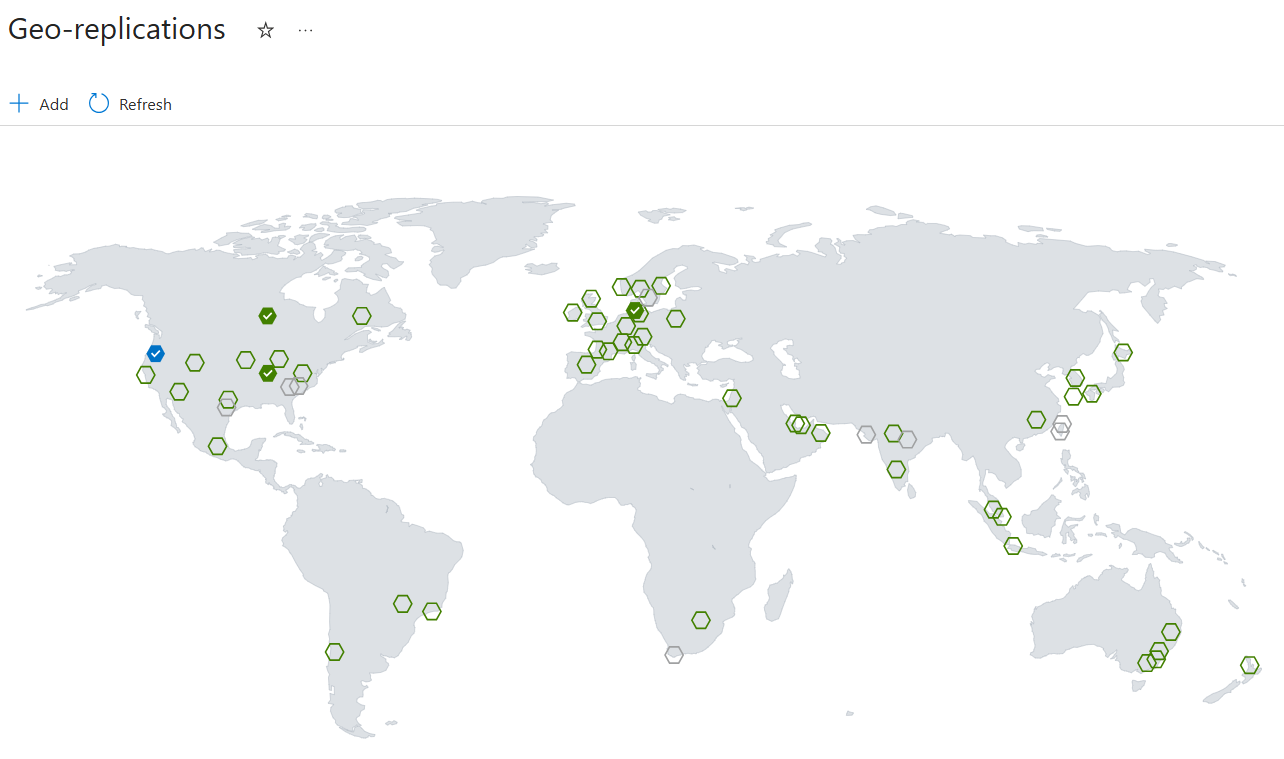
- Under Services, select Geo-replications.
- On the map:
- Blue hexagon: Home region (where you created the registry)
- Green hexagons: Available regions
- Gray hexagons: Unavailable regions
- Select a green hexagon, then select Create.
Azure CLI
# Create a replica
az acr replication create --registry myregistry --location eastus

# List replicas
az acr replication list --registry myregistry --output table

# Delete a replica
az acr replication delete --registry myregistry --name eastus
For more commands, see az acr replication.
Global endpoint of a geo-replicated registry
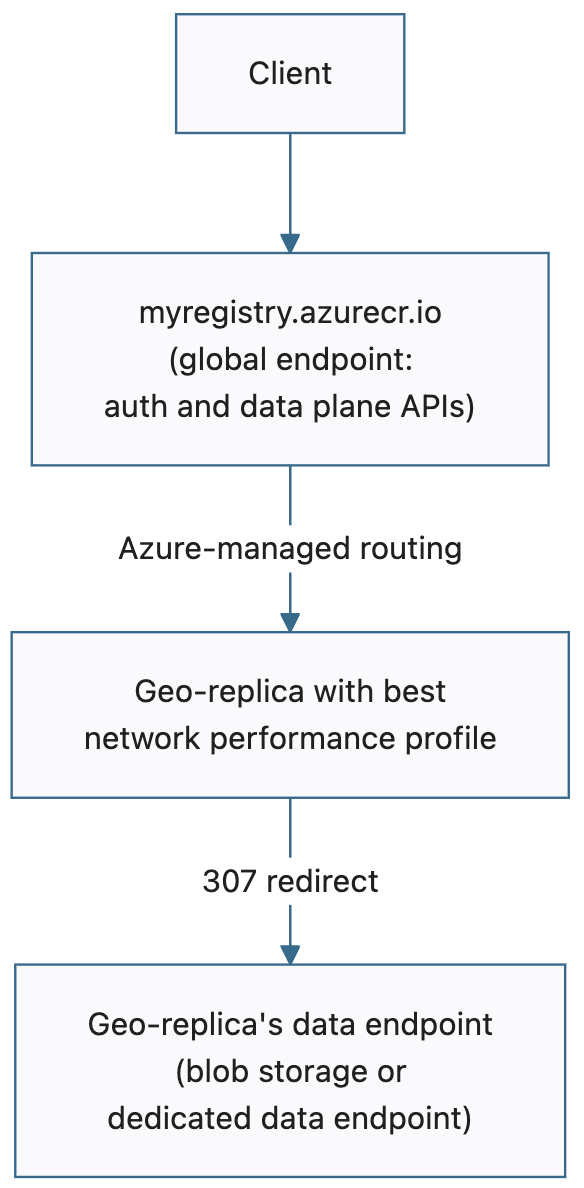
After configuring geo-replication, you can push, pull, or delete content in your registry through the registry's global endpoint (myregistry.azurecr.io).
How global endpoints work
When you push, pull, or delete through the global endpoint, ACR routes the request to the geo-replica with the best network performance profile for the client.
- The geo-replica with the best network performance profile from the client is usually the closest geo-replica.
- However, if the client is equidistant to multiple geo-replicas or the closest geo-replica is unavailable, requests might be routed elsewhere.
- ACR manages this routing. You don't control which geo-replica handles a specific request.
Using the global endpoint
Authenticate:
az acr login --name myregistry
Tag and push an image:
docker tag myapp:v1 myregistry.azurecr.io/myapp:v1
docker push myregistry.azurecr.io/myapp:v1
Pull an image:
docker pull myregistry.azurecr.io/myapp:v1
Import an image:
az acr import \
  --name myregistry \
  --source mcr.microsoft.com/hello-world:latest \
  --image hello-world:latest
Kubernetes deployment manifest:
apiVersion: apps/v1
kind: Deployment
metadata:
  name: myapp
spec:
  template:
    spec:
      containers:
      - name: myapp
        image: myregistry.azurecr.io/myapp:v1
Temporarily exclude a geo-replica from global endpoint routing
You can exclude a geo-replica from global endpoint routing by disabling the --global-endpoint-routing setting for a specific geo-replica. This is useful for maintenance or troubleshooting, or when you know a specific geo-replica or Azure region is experiencing degradation. You can even disable global endpoint routing for the home region geo-replica — the home region is only used for control plane operations, and its data plane traffic can be safely excluded from global routing. For more information on what the home region controls, see Home region outage behavior.
- When the
--global-endpoint-routingsetting for a specific geo-replica is set tofalse, ACR stops routing requests to that specific geo-replica for requests that go to the global endpoint. - Data continues syncing bidirectionally with a geo-replica even if global endpoint routing is disabled for that specific geo-replica. Every image pushed to the registry from any region while the geo-replica is excluded from global routing is still replicated to it. When you re-enable the geo-replica, it's immediately ready to serve traffic with no catch-up window.
- As such, storage quota and costs continue accruing for that geo-replica.
- If regional endpoints are enabled, the geo-replica's regional endpoint URL (
myregistry.<region-name>.geo.azurecr.io) continues to work even while global endpoint routing is disabled.--global-endpoint-routingcontrols only the geo-replica's participation in global endpoint routing.
# Exclude a geo-replica from global endpoint routing
az acr replication update --registry myregistry --name eastus \
  --global-endpoint-routing false

# Re-enable a geo-replica in global endpoint routing
az acr replication update --registry myregistry --name eastus \
  --global-endpoint-routing true
Note
In Azure CLI 2.86.0 and later, --region-endpoint-enabled was renamed to --global-endpoint-routing. The old flag name is deprecated and is removed in Azure CLI 2.87.0 (June 2026). If you have existing scripts or automation that use --region-endpoint-enabled, update them to use --global-endpoint-routing.
Important
Don't run a long-lived DNS cache for the global endpoint. When you disable global endpoint routing for a geo-replica, ACR purges DNS records server-side on a fast path. However, if clients run their own long-lived DNS cache for the global endpoint, those clients continue resolving to the disabled geo-replica until the client cache expires. A long-lived cache makes --global-endpoint-routing false appear not to take effect from the client's perspective.
Tip
You can optionally use a short-lived DNS cache for pushes to the global endpoint. A short-lived DNS pin scoped to the duration of a single push helps ensure push consistency by keeping all layers and the manifest going to the same geo-replica. This also avoids DNS bouncing, which can cause manifest errors — see Troubleshooting.
Regional endpoints of a geo-replicated registry (Preview)
Regional endpoints give you dedicated URLs for each replica, letting you specify exactly which regional geo-replica handles your push, pull, or delete request:
- myregistry.eastus.geo.azurecr.io
- myregistry.westeurope.geo.azurecr.io
Use regional endpoints when you need:
| Scenario | Description |
|---|---|
| Predictable routing | Ensure a workload always uses a specific replica for in-region affinity. |
| Client-side failover | Implement your own failover logic that explicitly switches between regions based on your own client-side health checks, independent of Azure's own health checks that back the global endpoint. |
| Push-pull consistency | Target a specific geo-replica for push, pull, and delete operations to avoid replication lag and eventual-consistency races in CI/CD pipelines or container deployment manifests. |
| Troubleshooting | Test or debug a specific regional replica. |
| Capacity planning | Know exactly which replica serves each workload so you can plan per-replica capacity and avoid throttling. |
Important
Health-aware failover doesn't apply to regional endpoints. When you use a regional endpoint, you're talking directly to one specific geo-replica. If that region degrades, ACR doesn't automatically reroute. Health-aware failover applies only to operations against the global endpoint (myregistry.azurecr.io). See the Client-side failover scenario in the preceding table.
Note
Throttling is per-replica, not per-registry. When you pin workloads to a single regional endpoint, you concentrate all traffic on that one geo-replica. If all your clusters use the same regional endpoint, you might hit that geo-replica's per-region throttling limits at peak. To mitigate, spread workloads across multiple regional endpoints for better capacity distribution, or use the global endpoint for workloads that don't need explicit pinning.
Regional endpoints coexist with global endpoints
Enabling regional endpoints doesn't disable or replace the global endpoint. You can use both simultaneously:
- Use the global endpoint (
myregistry.azurecr.io) if you prefer automatic routing managed by Azure across geo-replicas. - Use regional endpoints (
myregistry.<region-name>.geo.azurecr.io) if you want finer-grained client-side routing control, bypassing Azure-managed routing of the global endpoint entirely.
How regional endpoints work
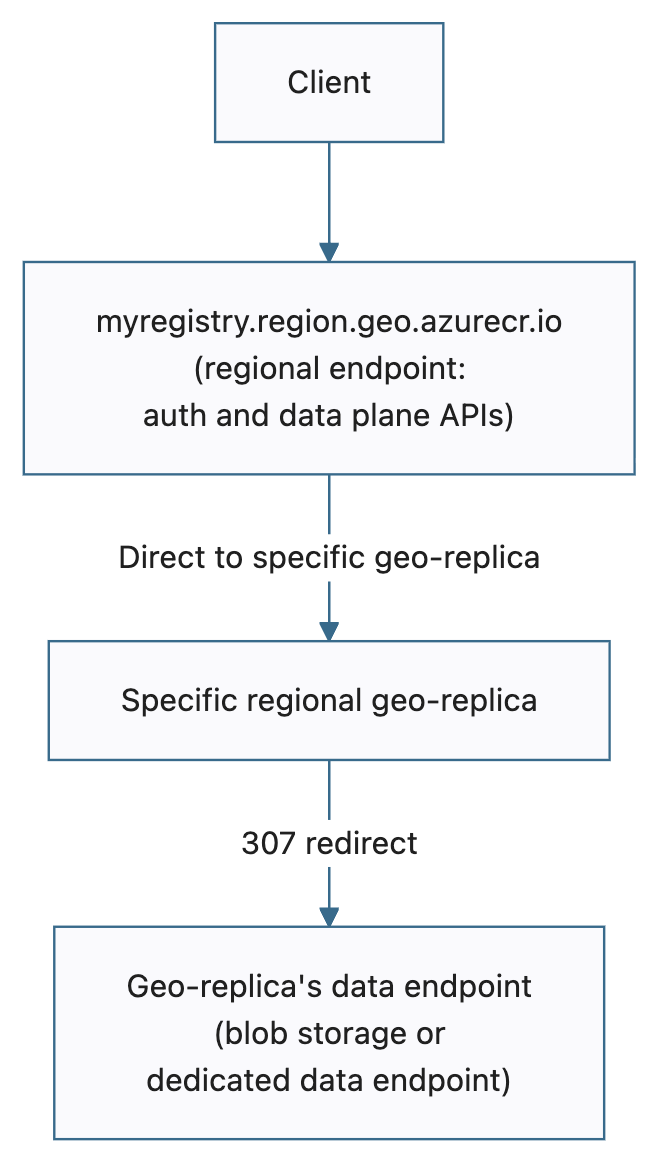
Regional endpoints function as login servers for specific geo-replicas. When you authenticate and interact with a regional endpoint instead of the registry's global endpoint, all your registry operations (authentication, artifact uploads/downloads, repository operations, and metadata actions) go directly to that specific regional replica, bypassing Azure-managed routing entirely.
Layer blob downloads (the actual container image layers) still follow your registry's existing configuration:
- Registries without private endpoints or dedicated data endpoints: When you download image layers from a specific geo-replica, layer blob downloads redirect to Azure storage accounts (
*.blob.core.windows.net). - Registries with private endpoints or dedicated data endpoints enabled: When you download image layers from a specific geo-replica, layer blob downloads redirect to the corresponding region's dedicated data endpoint (
myregistry.<region-name>.data.azurecr.io).
The following diagram illustrates the regional endpoint request flow:
Regional endpoints prerequisites
- Premium SKU — Regional endpoints are available exclusively on Premium tier registries.
- Azure CLI — Version 2.86.0 or later. All regional endpoints commands (
--regional-endpoints,az acr show-endpoints,az acr login --endpoint) are available natively in Azure CLI 2.86.0+.
Important
If you previously installed the private preview CLI extension: If you participated in the regional endpoints private preview and installed the acrregionalendpoint CLI extension, uninstall it to prevent conflicts with the built-in CLI commands:
az extension remove --name acrregionalendpoint
You can verify the extension is no longer installed with:
az extension list --query "[?name=='acrregionalendpoint']" -o table
Note
Regional endpoints can be enabled on any Premium SKU registry, even without geo-replication. A registry without geo-replication has a single geo-replica in the home region, which gets one regional endpoint URL. However, the feature is most useful when your registry has at least two geo-replicas.
Enable regional endpoints
You can enable regional endpoints when creating a new registry or update an existing registry.
Create a new registry with regional endpoints enabled:
az acr create \
  -n myregistry \
  -g myrg \
  -l regionname \
  --sku Premium \
  --regional-endpoints enabled
Enable regional endpoints on an existing registry:
az acr update \
  -n myregistry \
  -g myrg \
  --regional-endpoints enabled
Regional endpoints are enabled at the registry level and apply to every geo-replica. You can't enable regional endpoints for individual replicas. When you enable regional endpoints, Azure Container Registry automatically creates login server URLs for each of your geo-replicas.
Work with regional endpoints
Authenticate and use regional endpoints
Regional endpoints support the same authentication methods as the global endpoint: Microsoft Entra ID, service principals, managed identities, and admin credentials.
Important
Re-authenticate when switching endpoints. ACR tokens work across both global and regional endpoints. However, container tools like Docker and containerd store credentials per hostname, so switching from the global endpoint to a regional endpoint (or between regional endpoints) requires a new az acr login for that hostname. For AKS, the Kubernetes ACR credential provider handles this automatically when the endpoint changes.
Sign in to a specific regional endpoint:
az acr login --name myregistry --endpoint eastus
Tag and push an image to a regional endpoint:
docker tag myapp:v1 myregistry.eastus.geo.azurecr.io/myapp:v1
docker push myregistry.eastus.geo.azurecr.io/myapp:v1
Pull an image from a regional endpoint:
docker pull myregistry.eastus.geo.azurecr.io/myapp:v1
Use regional endpoints embedded in deployment manifests
You can specify regional endpoints directly in Kubernetes deployment manifests if you need to pin workloads to specific regions. This ensures clusters in specific regions always pull from their colocated replica, providing predictable routing and reduced latency.
East US cluster deployment:
apiVersion: apps/v1
kind: Deployment
metadata:
  name: myapp-eastus
spec:
  template:
    spec:
      containers:
      - name: myapp
        image: myregistry.eastus.geo.azurecr.io/myapp:v1
West Europe cluster deployment:
apiVersion: apps/v1
kind: Deployment
metadata:
  name: myapp-westeurope
spec:
  template:
    spec:
      containers:
      - name: myapp
        image: myregistry.westeurope.geo.azurecr.io/myapp:v1
By using different regional endpoints in each cluster's manifests, you can choose to guarantee that each cluster pulls from its local replica instead of relying on Azure-managed routing.
For information about authenticating Azure Kubernetes Service (AKS) with ACR, see Authenticate with Azure Container Registry from Azure Kubernetes Service.
Use regional endpoints with DNS-based routing without changing deployment manifests
If you don't want to maintain different deployment manifests per region, you can keep all manifests pointing to the global endpoint (myregistry.azurecr.io) and use software-defined networking or a regional traffic manager to resolve the global endpoint to the appropriate regional endpoint based on the originating region's traffic. This achieves the same colocation goals as regional endpoints (predictable routing and reduced latency) without embedding region-specific URLs in your deployment manifests.
For information about authenticating Azure Kubernetes Service (AKS) with ACR, see Authenticate with Azure Container Registry from Azure Kubernetes Service.
Import from specific geo-replicas using regional endpoints
When importing images between registries, you can use regional endpoints to import from a specific geo-replica of the source registry. This is useful for scenarios where you want predictable network paths or need to import from a replica in a specific region.
az acr import \
  --name mydownstreamregistry \
  --source myupstreamregistry.westeurope.geo.azurecr.io/myapp:v1 \
  --image myapp:v1
Regional endpoints network considerations
Firewall rules
If you're using ACR firewall rules or custom firewalls with regional endpoints, configure your firewall rules to allow access to:
| Endpoint | Purpose |
|---|---|
myregistry.<region-name>.geo.azurecr.io |
Regional endpoint for registry operations |
myregistry.azurecr.io |
Global endpoint (if also used) |
myregistry.<region-name>.data.azurecr.io |
Layer downloads (if using private endpoints or dedicated data endpoints) |
*.blob.core.windows.net |
Layer downloads (if not using private endpoints or dedicated data endpoints) |
Private endpoints
When a private endpoint is created for a registry inside a virtual network, the private endpoint resource exposes several virtual network private IPs that cover all of the registry's endpoint surfaces — the global endpoint, every regional endpoint (if regional endpoints are enabled), and every dedicated data endpoint (automatically enabled when a private endpoint is configured).
Each endpoint surface consumes one private IP address from the virtual network subnet. Plan your subnet sizing accordingly:
- 1 IP for the global endpoint (
myregistry.azurecr.io) - 1 IP per geo-replica for dedicated data endpoints (
myregistry.<region>.data.azurecr.io) — always enabled on registries with at least one private endpoint - 1 IP per geo-replica for regional endpoints (
myregistry.<region>.geo.azurecr.io) — only if regional endpoints are enabled
Example: A registry with 3 geo-replicas and regional endpoints enabled requires 1 (global) + 3 (data) + 3 (regional) = 7 private IP addresses per private endpoint resource. Without regional endpoints, the same registry requires 1 + 3 = 4 private IP addresses.
With many geo-replicas, private endpoint creation can fail if the subnet runs out of available IPs. For more information, see Connect privately to a registry from a virtual network using private endpoints.
Dedicated data endpoints
When regional endpoints are enabled together with dedicated data endpoints — either explicitly enabled or auto-enabled by having at least one private endpoint configured — layer blob downloads from regional endpoints automatically redirect to the geo-replica's dedicated data endpoint (myregistry.<region-name>.data.azurecr.io). The redirect always stays within the same region as the regional endpoint — a pull from myregistry.eastus.geo.azurecr.io always redirects to myregistry.eastus.data.azurecr.io, never to a data endpoint in a different region.
This same-region guarantee also applies when pulling from the global endpoint. ACR routes the request to the geo-replica with the best network performance profile for the client, and the serving geo-replica issues a 307 redirect to its own dedicated data endpoint — never cross-region.
Tip
Enable dedicated data endpoints for optimal in-region performance and a dedicated URL for layer downloads:
az acr update -n <registry-name> --data-endpoint-enabled true
For more information, see Dedicated data endpoints in Azure Container Registry.
Endpoint reference
For a complete reference of all registry endpoint types, URL formats, and the CLI flags that control them, see Azure Container Registry endpoint reference.
Troubleshooting
Push fails with manifest errors
A docker push is a sequence of HTTP requests: blob uploads for each layer, then a manifest upload that references those layers by digest. Some Linux DNS resolvers don't cache responses consistently. If there are several geo-replicas in nearby regions, DNS might resolve to different replicas during a single push (DNS bouncing), causing the pushed manifest to reference layers that were pushed to a different geo-replica. Because replication is eventually consistent, the manifest can land on a replica that doesn't yet have the layers it references, and the manifest validation fails.
Solutions (in order of preference):
- Use regional endpoints to pin the push to a single geo-replica end-to-end. Every subrequest (sign-in, blob uploads, manifest upload) goes to the same geo-replica. This is the cleanest fix and the recommended approach for any pipeline where push/pull consistency matters.
- Use a short-lived DNS cache like
dnsmasqscoped to the duration of a single push. For Linux VMs in Azure, see DNS name resolution options. The pin should last the push and no longer — don't run a long-lived DNS cache for the global endpoint, as it interferes with--global-endpoint-routing falseand with health-aware failover routing. - Design publish steps to be idempotent so retries triggered by mid-push failures are safe.
Geo-replica creation stuck for private endpoint-enabled registries
This issue usually arises when the identity creating a geo-replica for a private endpoint-enabled registry doesn't have sufficient permissions to create private endpoint networking resources.
Solution:
- To resolve, manually delete the geo-replica that got stuck in the provisioning state.
- Afterwards, ensure the identity has the permission
Microsoft.Network/privateEndpoints/privateLinkServiceProxies/writebefore creating a geo-replica. - Also verify that every private endpoint subnet connected to the registry has free IP capacity. If any subnet across any connected virtual network doesn't have enough free IPs, the replication provisioning fails and rolls back. The replica appears briefly in a
Creatingstate and then is removed. The resulting error doesn't identify which subnet or virtual network is exhausted. For subnet sizing guidance, see Connect privately to a registry using private endpoints.