In a Log Analytics workspace, tables organize log data from your data sources. Configure table properties to manage your data model, data access, and costs. For an overview on table types, column data types, and table schema, see Tables in Azure Monitor Logs.
To view and set table properties in the Azure portal:
From your Log Analytics workspace, select Tables.
The Tables screen presents table configuration information for all tables in your Log Analytics workspace.
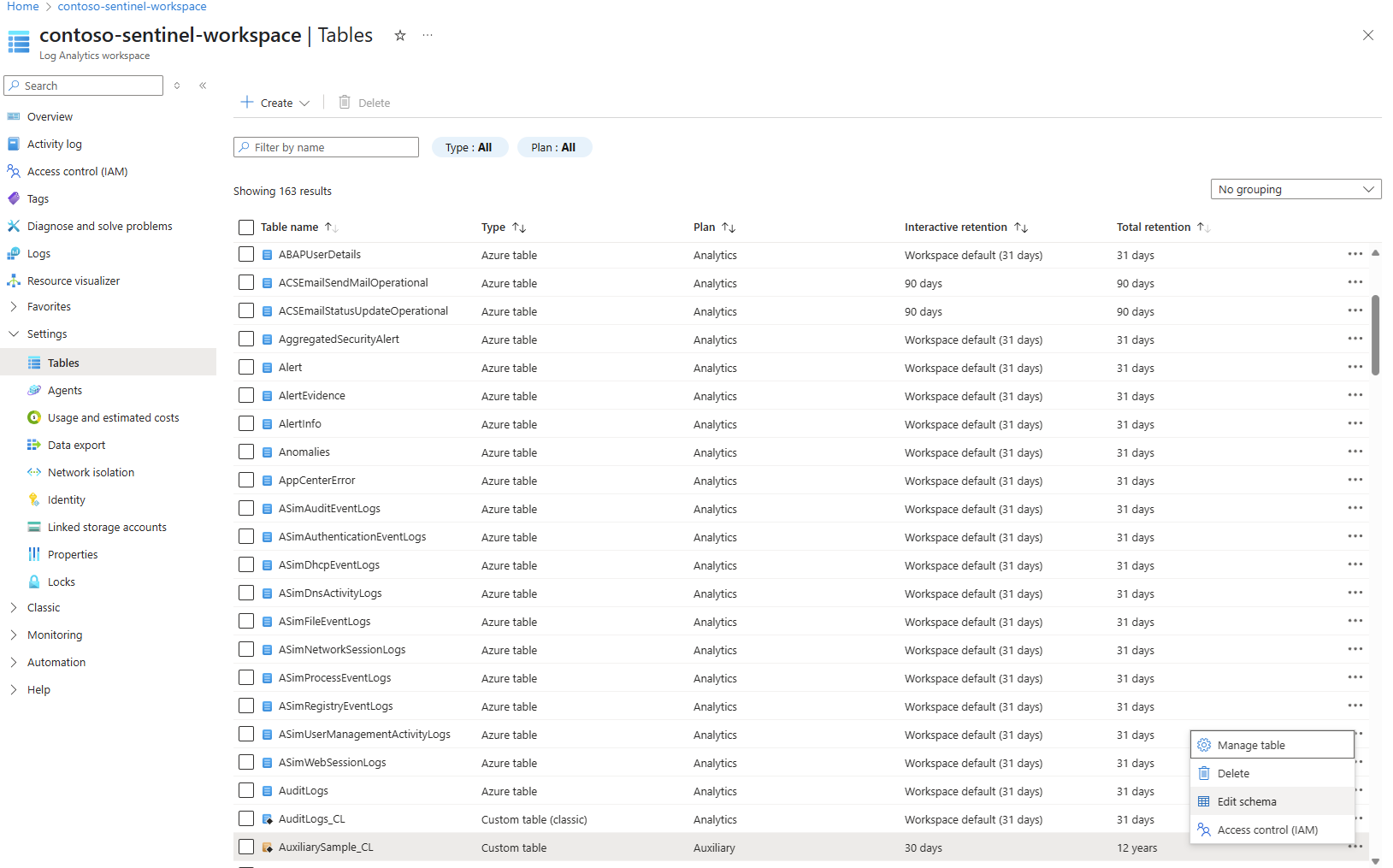
Select the ellipsis (...) to the right of a table to open the table management menu.
The available table management options vary based on the table type.
Select Manage table to edit the table properties.
Select Edit schema to view and edit the table schema. Even though the guid type is available for columns in the table schema, GUID values are stored and queried as strings. For more information, see Column data types in Azure Monitor Logs.
To manage table properties, call the Tables operation of the Logs management API.
Here's an example of how to call the API to view table properties:
GET https://management.azure.com/subscriptions/{subscriptionId}/resourcegroups/{resourceGroupName}/providers/Microsoft.OperationalInsights/workspaces/{workspaceName}/tables/{tableName}?api-version={api-version}
Response body
| Name |
Type |
Description |
| properties.plan |
string |
The table plan. Analytics, Basic, or Auxiliary. |
| properties.retentionInDays |
integer |
The table's interactive retention in days. For Basic and Auxiliiary, this value is 30 days. For Analytics, the value is between four and 730 days. |
| properties.totalRetentionInDays |
integer |
The table's total data retention, including interactive and long-term retention. |
| properties.archiveRetentionInDays |
integer |
The table's long-term retention period (read-only, calculated). |
| properties.lastPlanModifiedDate |
String |
Last time when the plan was set for this table. Null if no change was ever done from the default settings (read-only). |
Here's an example of how to call the API to view table schema:
GET https://management.azure.com/subscriptions/ContosoSID/resourcegroups/ContosoRG/providers/Microsoft.OperationalInsights/workspaces/ContosoWorkspace/tables/ContainerLogV2?api-version=2025-02-01
Sample response
Status code: 200
{
    "properties": {
        "retentionInDays": 8,
        "totalRetentionInDays": 8,
        "archiveRetentionInDays": 0,
        "plan": "Basic",
        "lastPlanModifiedDate": "2022-01-01T14:34:04.37",
        "schema": {...},
        "provisioningState": "Succeeded"
    },
    "id": "subscriptions/ContosoSID/resourcegroups/ContosoRG/providers/Microsoft.OperationalInsights/workspaces/ContosoWorkspace",
    "name": "ContainerLogV2"
}
Even though the guid type is shown for columns in the table schema, GUID values are stored and queried as strings. For more information, see Column data types in Azure Monitor Logs.
To view table properties using PowerShell, run:
Invoke-AzRestMethod -Path "/subscriptions/ContosoSID/resourcegroups/ContosoRG/providers/microsoft.operationalinsights/workspaces/ContosoWorkspace/tables/Heartbeat?api-version=2025-02-01" -Method GET
Sample response
{
  "properties": {
    "totalRetentionInDays": 30,
    "archiveRetentionInDays": 0,
    "plan": "Analytics",
    "retentionInDaysAsDefault": true,
    "totalRetentionInDaysAsDefault": true,
    "schema": {
      "tableSubType": "Any",
      "name": "Heartbeat",
      "tableType": "Microsoft",
      "standardColumns": [
        {
          "name": "TenantId",
          "type": "guid",
          "description": "ID of the workspace that stores this record.",
          "isDefaultDisplay": true,
          "isHidden": true
        },
        {
          "name": "SourceSystem",
          "type": "string",
          "description": "Type of agent the data was collected from. Possible values are OpsManager (Windows agent) or Linux.",
          "isDefaultDisplay": true,
          "isHidden": false
        },
        {
          "name": "TimeGenerated",
          "type": "datetime",
          "description": "Date and time the record was created.",
          "isDefaultDisplay": true,
          "isHidden": false
        },
        {
          "name": "ComputerPrivateIPs",
          "type": "dynamic",
          "description": "The list of private IP addresses of the computer.",
          "isDefaultDisplay": true,
          "isHidden": false
        }
      ],
      "solutions": [
        "LogManagement"
      ],
      "isTroubleshootingAllowed": false
    },
    "provisioningState": "Succeeded",
    "retentionInDays": 30
  },
  "id": "/subscriptions/aaaa0a0a-bb1b-cc2c-dd3d-eeeeee4e4e4e/resourceGroups/ContosoRG/providers/Microsoft.OperationalInsights/workspaces/ContosoWorkspace/tables/Heartbeat",
  "name": "Heartbeat"
}
Even though the guid type is available for columns in the table schema, GUID values are stored and queried as strings. For more information, see Column data types in Azure Monitor Logs.
Use the Update-AzOperationalInsightsTable cmdlet to set table properties.
