Note
Access to this page requires authorization. You can try signing in or changing directories.
Access to this page requires authorization. You can try changing directories.
Incrementally migrate a legacy system by gradually replacing specific pieces of functionality with new applications and services. As you replace features from the legacy system, the new system eventually comprises all of the old system's features. This approach suppresses the old system so that you can decommission it.
Context and problem
As systems age, the development tools, hosting technology, and system architectures that they're built on can become obsolete. As new features and functionality are added, these applications become more complex, which can make them harder to maintain or extend.
It's difficult to replace an entire complex system. Instead, you can migrate to a new system gradually and use the old system for unmigrated features. However, if you run parallel versions of an application, clients must track which version contains each feature. When you migrate a feature or service, you must direct clients to the new location. To address these challenges, adopt an approach that supports incremental migration and minimizes disruptions to clients.
Solution
After you identify new service boundaries, use an incremental process to replace specific pieces of functionality with new applications and services. Customers continue to use the same interface and are unaware that a migration is in progress.
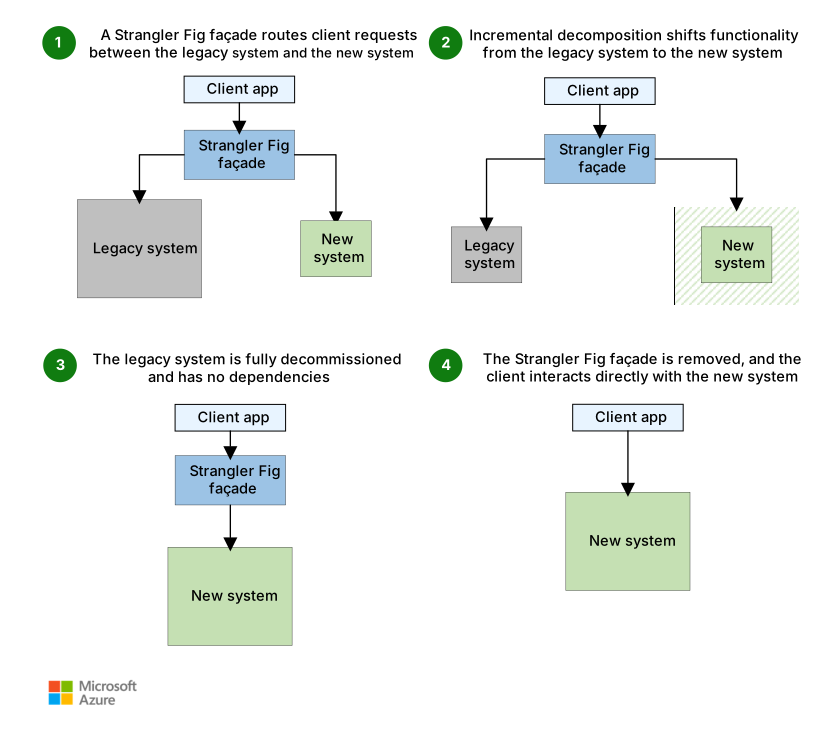
Download a Visio file of this architecture.
The Strangler Fig pattern provides a controlled and phased approach to modernization. It allows the existing application to continue functioning during the modernization effort. A façade (proxy) intercepts requests that go to the back-end legacy system. The façade routes these requests either to the legacy application or to the new services.
This pattern reduces risks in migration by enabling your teams to move forward at a pace that suits the complexity of the project. As you migrate functionality to the new system, the legacy system becomes obsolete, and you decommission the legacy system.
The Strangler Fig pattern begins by introducing a façade (proxy) between the client app, the legacy system, and the new system. The façade acts as an intermediary. It allows the client app to interact with the legacy system and the new system. Initially, the façade routes most requests to the legacy system.
As the migration progresses, the façade incrementally shifts requests from the legacy system to the new system. With each iteration, you implement more pieces of functionality in the new system.
This incremental approach gradually reduces the legacy system's responsibilities and expands the scope of the new system. The process is iterative. It allows the team to address complexities and dependencies in manageable stages. These stages help the system remain stable and functional.
After you migrate all of the functionality and there are no dependencies on the legacy system, you can decommission the legacy system. The façade routes all requests exclusively to the new system.
You remove the façade and reconfigure the client app to communicate directly with the new system. This step marks the completion of the migration.
Problems and considerations
Consider the following points as you decide how to implement this pattern:
Consider how to handle services and data stores that both the new system and the legacy system might use. Make sure that both systems can access these resources at the same time.
Structure new applications and services so that you can easily intercept and replace them in future strangler fig migrations. For example, strive to have clear demarcations between parts of your solution so that you can migrate each part individually.
After the migration is complete, you typically remove the strangler fig façade. Alternatively, you can maintain the façade as an adapter for legacy clients to use while you update the core system for newer clients.
Conceptualize this as transitional architecture, and balance this architecture's risk mitigation benefits against its temporary infrastructural costs.
Make sure that the façade keeps up with the migration.
Make sure that the façade doesn't become a single point of failure or a performance bottleneck.
Plan for cross-system dependencies. During migration, both systems need to coexist and communicate. For example, the new system might need to call unmigrated functionality from the legacy system, and unmigrated legacy components might need to call migrated functionality from the new system. To manage these calls, use the Anti-corruption Layer pattern. An anti-corruption layer acts as an adapter that translates requests between the two systems. This layer protects the new system's design from legacy semantics so that the legacy system can reach new services without significant code changes. Without this adapter, cross-system dependencies can break components or force the new system to adopt legacy conventions.
When to use this pattern
Use this pattern when:
You gradually migrate a back-end application to a new architecture, especially when replacing large systems, key components, or complex features introduces risk.
The original system can continue to exist for an extended period of time during the migration effort.
This pattern might not be suitable when:
Requests to the back-end system can't be intercepted.
You can't access the legacy system's source code. To disable migrated features and redirect internal calls, you need to be able to modify the legacy system's source code.
You migrate a small system and replacing the whole system is simple.
You need to fully decommission the original solution quickly.
Workload design
Evaluate how to use the Strangler Fig pattern in a workload's design to address the goals and principles of the Azure Well-Architected Framework pillars. The following table provides guidance about how this pattern supports the goals of each pillar.
| Pillar | How this pattern supports pillar goals |
|---|---|
| Reliability design decisions help your workload become resilient to malfunction and to ensure that it recovers to a fully functioning state after a failure occurs. | This pattern's incremental approach can help mitigate risks during a component transition compared to making large systemic changes all at once. - RE:08 Testing |
| Cost Optimization focuses on sustaining and improving your workload's return on investment (ROI). | The goal of this approach is to maximize the use of existing investments in the currently running system while modernizing incrementally. It enables you to perform high-ROI replacements before low-ROI replacements. - CO:07 Component costs - CO:08 Environment costs |
| Operational Excellence helps deliver workload quality through standardized processes and team cohesion. | This pattern provides a continuous improvement approach. Incremental replacements that make small changes over time are preferable to large systemic changes that are riskier to implement. - OE:06 Supply chain for workload development - OE:11 Safe deployment practices |
Consider any trade-offs against the goals of the other pillars that this pattern might introduce.
Example
Legacy systems typically depend on a centralized monolithic database that serves multiple domains. Over time, this shared database becomes difficult to manage and improve because of its cross-domain dependencies. To address this challenge, the Strangler Fig pattern incrementally extracts domain-specific tables, stored procedures, and related data from the monolithic database into isolated domain databases. Each database contains only one domain. Repeat the extraction process until the monolithic database is fully decomposed.

Introduce a new system service, which starts to manage requests for its domain. The new system service still reads from and writes to the monolithic database for its domain tables. The legacy system continues to serve all other domains.
Introduce an isolated domain database for the new system. Migrate the relevant domain tables and their historical data to the new database by using an extract, transform, and load (ETL) process. A change data capture (CDC) process syncs the domain data from the monolithic database to the new domain database. During this phase, the legacy system continues to read from and write to the monolithic database, and the new system writes to the new domain database. Validate consistency between both databases before cutover.
After validation, the new domain database is the system of record for that domain. The new system performs all read and write operations against the domain database. Remove the corresponding domain tables, stored procedures, and dependencies from the monolithic database. Repeat this process for each domain until the monolithic database is fully decomposed.
You can roll back to the monolithic database during phase 2 and at the start of phase 3, when the domain tables and synchronization processes still exist in the monolithic database. To roll back to the monolithic database after you remove the domain tables, stored procedures, and synchronization processes from the monolithic database, you must restore those objects and replay data changes. However, this process significantly increases effort and risk. Treat the removal of legacy objects as a deliberate final step for each domain. Remove legacy objects only after the new system is validated.
Contributors
Microsoft maintains this article. The following contributors wrote this article.
Principal authors:
- Adnan Khan | Senior Cloud Solutions Architect
- Ovais Mehboob Ahmed Khan | Senior Cloud Solution Architect
To see nonpublic LinkedIn profiles, sign in to LinkedIn.
Next step
- Read Martin Fowler's blog post about Strangler Fig pattern application